Forget expensive cable packages and complicated setups. Your Amazon Fire TV Stick is a powerful gateway to a world of free television, including coveted UK and US catch-up services. This comprehensive guide will show you exactly how to unlock catch up tv on firestick, transforming your device into a global entertainment hub. We’ll cover everything from safe, official apps to advanced methods, ensuring you can watch your favorite shows on demand.
Table of Contents
What Is Catch Up TV on Firestick?
Catch-up TV refers to the service offered by broadcasters that allows you to watch shows you missed after their original air date. Traditionally, this was limited to a network’s own website or app, often with geographic restrictions. Using catch up tv on firestick means bringing these services directly to your television, consolidating content from BBC iPlayer, ITV Hub, Hulu, and more onto one device.
This transforms your Firestick from a simple Netflix machine into a comprehensive TV portal. You can access last night’s episodes, entire seasons, and exclusive online content. The process typically involves installing specific streaming apps, and sometimes configuring network settings for optimal access.
Official vs. Unofficial Catch Up Services
Official services are apps directly published by broadcasters like the BBC or ITV on the Amazon Appstore. They are legal, high-quality, but often require a local subscription or TV license and use geo-blocking. Unofficial, or third-party, apps aggregate free streaming links from various sources across the web. They offer broader access without fees but can vary in reliability and legality depending on your location and content sources.
Summary: Catch-up TV on Firestick lets you watch missed TV shows on demand by installing broadcaster apps or third-party aggregators directly on your device, turning it into a centralized on-demand hub.
Why Use a Firestick for Catch Up TV?
The Firestick’s portability, affordability, and powerful software make it ideal. It runs a version of Android, allowing for great flexibility in app installation beyond the official store. With over 150 million Fire TV devices sold, developers heavily target the platform, ensuring a vast selection of firestick streaming apps.
Compared to gaming consoles or smart TV interfaces, the Firestick is dedicated, low-power, and receives frequent updates. Its voice search via Alexa remote can scour multiple apps at once, saving you time hunting for a specific episode across different catch-up services.
Cost Savings and Content Access
You can replace multiple paid subscriptions with free, ad-supported catch-up services. For travelers or expats, it’s a lifeline to home country programming. A 2023 study indicated that over 30% of cord-cutters use free ad-supported streaming TV (FAST) apps as a primary content source, a category that includes many catch-up services.
Pro Tip: Pair your Firestick with a high-speed internet connection (min 15 Mbps) for buffer-free HD streaming, especially when using data-heavy catch-up services.
Preparation: What You Need Before You Start
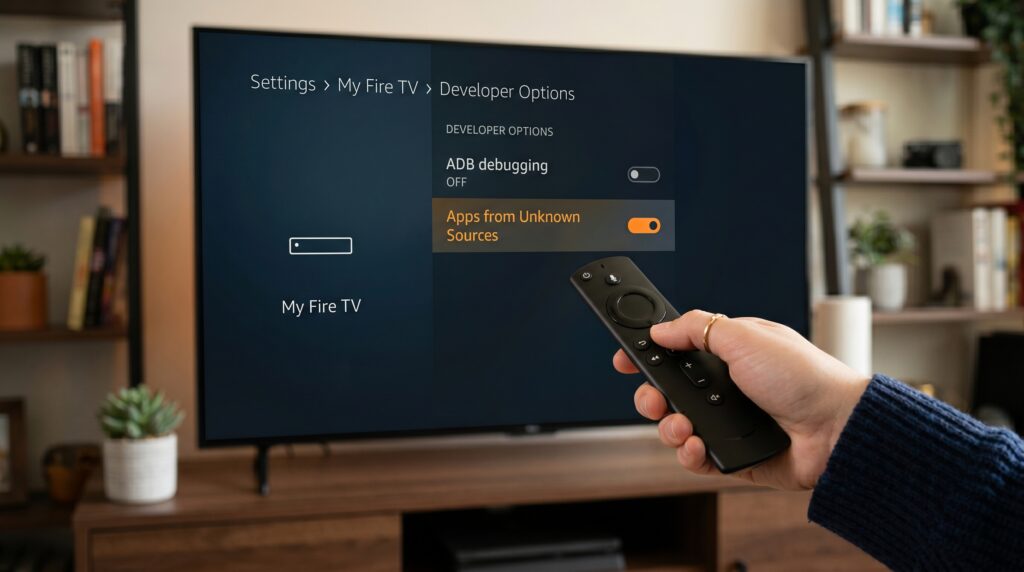
First, ensure your Firestick is updated to the latest Fire OS software (Settings > My Fire TV > About > Check for Updates). You will need a stable Wi-Fi connection and an Amazon account linked to the device. For installing apps outside the Amazon Appstore, you must enable one critical setting.
Enabling Apps from Unknown Sources
This allows installation of apps not vetted by Amazon. Navigate to Settings > My Fire TV > Developer Options. If Developer Options is hidden, go to Settings > My Fire TV > About, then click on “Fire TV Stick” 7 times until a message appears. Now, toggle “Apps from Unknown Sources” ON.
Security Note: Only download apps from reputable sources like the official app stores or well-known, trusted downloader apps to minimize security risks.
Method 1: Official Apps & VPN (The Legal Route)
This method involves installing broadcaster apps directly from the Amazon Appstore. However, apps like BBC iPlayer or ITV Hub restrict access to UK IP addresses. To bypass this, you need a reliable VPN (Virtual Private Network) installed directly on your Firestick.
Choosing and Installing a VPN
Select a VPN known for reliably bypassing geo-blocks and with a dedicated Firestick app (e.g., NordVPN, ExpressVPN). Search for it in the Amazon Appstore, install it, and log in with your subscription details. Connect to a server in the required country (e.g., UK for BBC).
Once connected, your Firestick’s internet traffic appears to originate from that country, tricking the catch-up app into granting access. This is legal in many regions but may violate the app’s Terms of Service.
Mini Case Study: A user in New York uses ExpressVPN on their Firestick, connects to a London server, and successfully installs and streams from Channel 4’s All 4 app for free, accessing UK-specific shows unavailable in the US.
Method 2: Third-Party Apps (The Free Route)
This approach uses apps that aren’t on the Amazon Appstore. They act as portals, scraping the web for publicly available video streams. The most popular method is to use a “downloader” app to install an APK file from a website.
Using Downloader to Install Apps
The Downloader app (available on Amazon Appstore) is a simple browser for your Firestick. You input the direct download URL of an app’s APK file, and it handles the installation. Always ensure you have the correct, official URL for the app to avoid malware.
After installation, you can find these apps under “Your Apps & Channels.” They often feature massive libraries combining live TV, movies, and catch-up sections from various international networks.
Expert Insight: While convenient, third-party app links can go offline. For stability, consider apps with dedicated maintenance teams and active user communities that provide regular updates.
Step-by-Step Guide: Installing Catch Up TV Apps
Follow this universal process for most third-party apps. We’ll use the popular “Cinema HD” (as an example) for demonstration.
On your Firestick home screen, use the search function and find “Downloader.” Install it.
Open Downloader. The first time, it may ask for permission to access files—grant it
.In the URL field, enter the exact, trusted download link for the app (e.g., www.example.com/app.apk).
Wait for the file to download. The Downloader app will then prompt you to install it.
Click “Install.” The process will take a moment to complete.
Once installed, click “Open” to launch the app or “Done” to return to Downloader.
On your Firestick home screen, use the search function and find “Downloader.” Install it.
Important: Go back into the Downloader app settings and clear its cache and downloads to free up space.
Your new app will now be available in the “Your Apps & Channels” section on the home screen.
Top Apps for Catch Up TV on Firestick
Here is a comparison of top apps for accessing free content, combining official and third-party options.
App Name
Type
Key Content
VPN Required?
Best For
BBC iPlayer
Official
BBC shows, documentaries, news
Yes (UK Server)
High-quality UK programming
Tubi
Official (US)
Movies & TV shows (ad-supported)
No (in US)
Massive free US library
Pluto TV
Official
Live channels & on-demand
No
Live TV experience
Stremio + Add-ons
Third-Party
All-in-one aggregator
Recommended
Customizable, unified library
Maintaining and Updating Your Apps
Official apps update automatically from the Amazon Appstore. Third-party apps often have an “Update” section inside the app itself. Check it periodically. Outdated apps may break, as streaming links and interfaces change frequently.
Regularly manage your Firestick’s storage (Settings > Applications > Manage Installed Applications) by clearing app caches. This prevents slowdowns and ensures optimal performance for your catch up tv on firestick experience.
Common Mistakes to Avoid
Skipping the VPN for Official Geo-blocked Apps: Trying to open BBC iPlayer without a UK VPN will result in an immediate location error message.
Using Unreliable APK Sources: Downloading from random blog links can lead to malware, adware, or broken apps. Stick to the app’s official website.
Ignoring ISP Throttling: Some ISPs slow down streaming traffic. A VPN can also help mask your activity, preventing this throttling and improving speeds.
Forgetting to Clear Cache: The Downloader app and streaming apps store temporary files that quickly fill the Firestick’s limited storage, causing crashes.
Not Using a Debriefing Tool: For a cleaner experience, use an app like “Background Apps and Processes List” to force-stop apps running in the background and free up RAM.
Frequently Asked Questions (FAQs)
Is catch up TV on Firestick legal?
Using official apps with a valid TV license/subscription is legal. Using third-party apps falls into a gray area; streaming is generally low-risk, but distributing content is illegal. Always check your local laws.
Do I need a VPN for all catch up TV?
No. Only for apps that are geo-restricted to specific countries, like UK broadcasters. US-based free apps like Pluto TV do not require a VPN for domestic access.
Why does my app buffer constantly?
This is usually due to slow internet, ISP throttling, or a poor VPN server connection. Test your speed, try a different VPN server, or connect your Firestick via Ethernet using an adapter.
Can I record catch up TV on my Firestick?
Not directly. The Firestick lacks built-in recording. You would need screen-recording software on a connected PC or use a dedicated cloud DVR service if the app supports it.
What’s the best free catch up TV app?
Tubi and Pluto TV offer excellent official, legal content in the US. For international content, Stremio with community add-ons provides a powerful, all-in-one solution.
How do I update third-party apps?
Most have an update notification or section within the app’s settings or menu. You typically download and install the new APK, which overwrites the old version.
Conclusion: Start Streaming Today
Unlocking a world of free television is simpler than you think. By following the methods outlined—from using a VPN with official apps to exploring versatile third-party options—you can dramatically expand your viewing library and enjoy content from around the world. The secret to getting the most from catch up tv on firestick is preparation, choosing trusted sources, and keeping your device optimized for smooth performance.
One of the biggest advantages of catch up tv on firestick is the flexibility it offers. Instead of being tied to traditional broadcast schedules, you can watch your favorite programs whenever it suits you. Whether you missed a popular drama, a live sporting event, a reality show, or the latest news broadcast, catch up tv on firestick makes it easy to stay up to date without the hassle of recording content in advance.
Another reason so many users choose catch up tv on firestick is the wide range of apps and services available. From major UK broadcasters to international streaming platforms, there are countless ways to access on-demand programming. With the right setup, catch up tv on firestick can provide a seamless entertainment experience that rivals expensive cable subscriptions.
To get the best results from catch up tv on firestick, remember to regularly update your Firestick, clear unused apps, and ensure you have a stable internet connection. These simple maintenance steps can significantly improve streaming quality and reduce buffering issues. Pairing your Firestick with a reliable VPN can also help enhance privacy and unlock additional content libraries, making catch up tv on firestick even more versatile.
Whether you’re catching up on British dramas, exploring American TV series, or discovering new international content, catch up tv on firestick opens the door to endless entertainment. The convenience, affordability, and variety offered by catch up tv on firestick make it an excellent choice for viewers who want more control over what they watch and when they watch it.
Ready to begin? Your journey to seamless catch up tv on firestick starts now. Explore new apps, discover fresh content, and experience the freedom that catch up tv on firestick provides. With the right tools and a little setup, catch up tv on firestick can transform the way you enjoy television and help you never miss your favorite shows again.